Wolf Grounds
Install Wolf Grounds Tap Share › View More › "Add to Home Screen"
Wolf Grounds – Bot de Discord para PUBG | Estadísticas, avisos en directo y VODs
Fetching intel…
Live now
● Comprobando…

El bot de PUBG que tu servidor necesita.

Wolf Grounds lleva estadísticas de partidas, bajas destacadas, clips de VOD y avisos de directos a tu Discord, pensado para comunidades de PUBG que quieren contenido y no ruido.

Gratis y lo puedes quitar cuando quieras. Solo pide lo que usan sus funciones: publicar estadísticas, crear sus propios canales, voz privada para LFG y apodos de Seasonal Crown. No puede expulsar, banear ni silenciar. O únete a la comunidad de Wolf Grounds →

⚡ Listo en 2 minutos 🌐 Varios servidores 🤖 Con IA
En vivo · datos de la comunidad
Jugadores
—
Bajas totales
—
% de tiros a la cabeza
—
Disparo más largo
—
En vivo
Modo —
Mapa —
Squad —
Bajas —
Jugadores —
Wolf Reports

Mira la baja, no una captura de ella.

Wolf Grounds une la telemetría de bajas de PUBG con el VOD del streamer y salta al segundo exacto. Son reports reales de los últimos 30 días: dale al play.

— → —
Arma
—
Mapa
—
POV
—
Últimos reports 8 con VOD
En Discord

Publicaciones limpias. Datos reales.

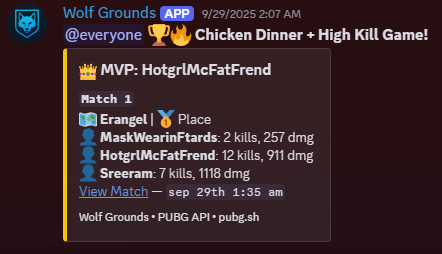
Cada publicación se entiende de un vistazo: victorias, bajas destacadas, enlaces a VODs y resúmenes semanales con el mismo estilo.
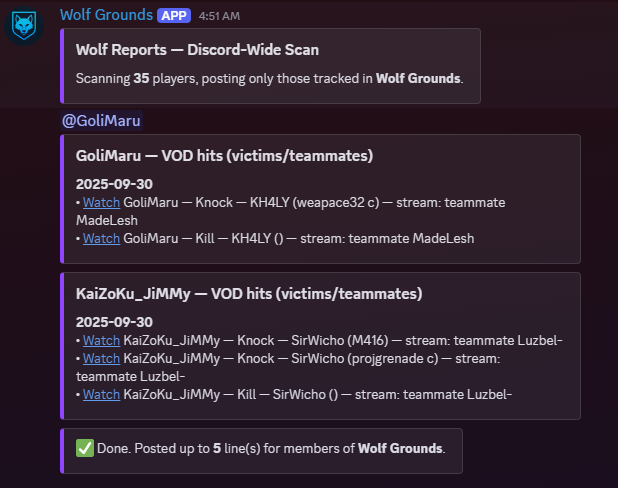
Un Wolf Report en Discord: una baja destacada con las estadísticas del jugador y el VOD de Twitch enlazado. Wolf Report · baja destacada + VOD
Un resumen de Chicken Dinner en Discord con las bajas y la posición del equipo ganador. Chicken Dinner · resumen del equipo
🎥 POV 1
🎥 POV 2
Clips de doble vista

Dos POVs.
Un momento.

Mira los VODs de Twitch del que mata y de la víctima uno al lado del otro y sincronizados. La corrección automática los mantiene a ±0,4 segundos.

⌨ Atajos: [ ] izquierda · ; ' derecha 🔒 Sincronía automática de ±0,4 s 🎥 Cualquier par de VODs de Twitch
Abrir doble vista ↗
Funciones

Todo lo que tu servidor de PUBG necesita.

Configuración sin complicaciones. Wolf Grounds se encarga de estadísticas, jugadas destacadas, avisos de directos y resúmenes semanales para que tu comunidad no se pierda nada.

Por lo que todos lo añaden

Estadísticas y evolución del K/D

Estadísticas por jugador y modo, historial de partidas, resúmenes de victorias y gráficos de la evolución del K/D.

Nadie más lo hace

Jugadas destacadas en VOD

Une la telemetría de bajas de PUBG con los VODs de los streamers. Incluye Wolf Reports, Clips y enlaces Dual-POV.

Clasificaciones Clasificaciones por modo (Solo/Duo/Squad, FPP/TPP) con mínimo de partidas y publicaciones limpias en Discord.
Avisos de directos Publica directos de Twitch automáticamente, sin duplicados y en el canal que elijas. Vincula nombres de PUBG con cuentas de Twitch.
Pregunta a la IA Pregunta por las estadísticas, el dominio de armas, la telemetría y el historial de partidas de tu servidor con tus propias palabras, en Discord o en la web.
Dominio de armas Mejores armas, daño, bajas y nivel de dominio de cada jugador, directamente de la API de PUBG.
Buscar grupo Crea publicaciones LFG con botones para unirse o salir, canales de voz privados y una lista en vivo de jugadores activos.
Retos y metas Duelos de estadísticas de 7 días entre jugadores, además de metas de comunidad para toda la plantilla del servidor.
Progreso y resúmenes Evolución semanal de tus estadísticas y resúmenes de temporada por IA a partir de todo tu historial de telemetría.
Varios servidores Cada servidor de Discord tiene su propia plantilla, suscripciones de streams, metas y ajustes.
THE DEN Tu casa en Wolf Grounds: tu perfil, tus últimas partidas y clips, y la configuración, plantilla, publicaciones y moderación de cada servidor que gestionas.
Comandos de barra

Cualquier estadística al instante.

Sin paneles. Cada función está a un comando de barra en Discord.

/stats player Estadísticas detalladas de cualquier jugador, filtradas por modo (Solo/Duo/Squad, FPP/TPP).
/stats leaderboard Clasificación del servidor por K/D, daño o victorias con mínimo de partidas.
/stats kd Gráfico de la evolución del K/D de un jugador en sus últimas N partidas.
/stats weapon Dominio de armas en detalle: mejores armas, daño, bajas y nivel de dominio.
/stats wins Resumen de los últimos 5 chicken dinners de un jugador con detalles de cada partida.
/stats funfacts Publica 5 clasificaciones curiosas con la plantilla del servidor.
/wolf report Tus Wolf Reports: bajas y derribos destacados enlazados a VODs de streamers.
/wolf clips Tus Wolf Clips: bajas destacadas desde la vista del streamer con enlaces Dual-POV.
/wolf card Genera una tarjeta de jugador para compartir con tus estadísticas de la temporada.
/wolf progress Evolución semanal que muestra cómo han cambiado tus números.
/wolf challenge Reta a otro jugador a un duelo de estadísticas de 7 días y síguelo en directo.
/wolf set-goal Fija una meta de comunidad para que toda la plantilla vaya a por ella.
/wolf match-night Programa una noche de partidas de la comunidad y deja que el bot avise al servidor.
/wolf season-recap Resumen de temporada generado por IA a partir de todo tu historial de telemetría.
/discord lfg Crea una publicación para buscar grupo con botones para unirse y un canal de voz privado.
/discord join Añade un nombre de PUBG a la plantilla de este servidor.
/twitch add Suscribe a un streamer de Twitch para recibir avisos de directo en este servidor.
/twitch spotlight Destaca al mejor streamer de PUBG del servidor según los últimos Wolf Clips.
/help Muestra todos los comandos y cómo usar el asistente de IA Wolf Bot.
Gratis

¿Listo para mejorar tu Discord de PUBG?

Listo en dos minutos. Sin tarjeta. Gratis hasta 10 jugadores.

⚡ Añadir Wolf Grounds a Discord ❤ Hazte miembro
FAQ

Preguntas frecuentes

Sí. Wolf Grounds usa las APIs públicas de PUBG y respeta todos sus límites y términos de servicio. Sin mods ni trampas, solo datos.
Wolf Grounds evita avisos de directo repetidos, agrupa las partidas con muchas bajas y mantiene cada publicación breve. Menos spam, más contenido.
Sí. Cada servidor tiene su propia plantilla, ajustes y suscripciones de streams. Nada se mezcla entre servidores.
Los admins ya pueden gestionar ajustes, plantillas y enlaces de Twitch desde THE DEN, nuestro panel web. La exportación a CSV es lo próximo, y una API pública llegará más adelante.
Sí. Añadir Wolf Grounds es gratis y el nivel gratuito sigue siéndolo: hasta 10 jugadores en la plantilla, consultas de estadísticas, clasificaciones y 2 preguntas a la IA al día. Las membresías desde 1,99 $/mes amplían la plantilla y añaden publicaciones automáticas de partidas, avisos de Twitch y Wolf Reports.
Añade Wolf Grounds a tu servidor de Discord en dos minutos: pulsa «Añadir a Discord» y sigue los pasos. Después usa /discord join para añadir jugadores a tu plantilla, o entra en THE DEN para añadirlos y terminar la configuración desde la web.
Hoja de ruta

Hacia dónde vamos.

Lo que sale ahora, lo próximo y lo que viene más adelante.

Ahora
Mejoras de la web móvil
Mejoras de comandos y corrección de errores
Mejoras de rendimiento
Más adelante
API pública
Expansión a otros juegos
Jugadas destacadas con machine learning
Cambios

Últimas actualizaciones

Week of Sep 28, 2026
# 🐺 This week Wolf Grounds got a MASSIVE glow-up — setup's smoother, ranked tracking's bulletproof, and The Den just became your command center. Let's go. 🔥
Bug Fix The play calendar on phones was squeezed into about two-thirds of the panel width, making the day squares smaller than they should be. It now uses the full width.
Bug Fix New servers get their full settings panel in <#1430954539250487516> again, and servers that were missing it will get it automatically. Server owners now get one clear welcome message that says exactly what to do next.
Bug Fix /wolf ask now has up-to-date ranked and season info: seasons last about two months, tiers run from Bronze up to Survivor (including Crystal), and each new season starts with placement matches based on last season's RP. It also no longer guesses at game facts it isn't sure about.
Bug Fix The "Live now" bar on the website only shows streamers who are actually playing PUBG, and it now keeps itself up to date — streamers drop off within a few minutes of going offline, even if you leave the page open.
Bug Fix Ranked promotion alerts now announce every division climb (like Gold IV to Gold III), not just new tiers. The Top Ranked crown now goes to the player with the highest rank and RP, where before players in the same division could tie and the crown went to whoever was listed first.
Bug Fix Ranked promotion and drop announcements now post reliably. The bot checks everyone's rank every few hours, so climbing a tier gets called out soon after it happens instead of being missed. Players in more than one server now get announced in each of them.
Bug Fix Throwback Thursday now posts every week; it had been skipping weeks. Stat challenges now score what each player gained during the 7 days instead of their whole season, and challenges that were never accepted expire so you can issue a new one. Season recaps post automatically when a new season starts, and crown announcements no longer say "dethroning None".
Bug Fix Player stats pages and clan rosters now show when an account has been banned by PUBG again. Ban status is checked with every stats refresh, and the banner goes away if a ban is lifted.
Bug Fix Crystal rank is now recognised properly. Moving from Platinum to Crystal is announced as a promotion instead of a rank drop, Crystal players now sit in the right place on the Ranked Crown and ranked leaderboard, and Survivor rank is supported too.
Bug Fix Commands no longer time out with "The application did not respond" while the bot is checking recent matches for wins and high-kill games.
Bug Fix Player profiles now show PUBG bans correctly, including for players who aren't in any Wolf Grounds server. Banned accounts get a clear "Permanent ban" or "Temporary ban" label instead of just looking inactive.
Bug Fix /maps works again. It shows the full map image and lets you switch maps from the dropdown, and Rondo and Haven are now included.
Bug Fix Clicking "Live on Twitch" on a player's card on the Feeds page, or the live badge on their stats page, now opens their stream. Before, it showed a Twitch error. The stream popup also has an "Open on Twitch" button if you'd rather watch there.
Bug Fix Fun Friday and the weekly best match DM can now be switched on and off from the website.
New Feature Server admins can run /discord setup to bring back the Wolf Grounds settings panel, or to finish setup after giving the bot the Manage Channels permission.
New Feature Server owners can add up to 10 players at once with the new Add players button in #wolf-setup. Paste the names, and Wolf Grounds checks them all with PUBG and tells you which ones need fixing.
New Feature New /stats ranked command for Pack Leader servers! See any player's ranked tier, RP, season-best rank, win rate, top-10 rate, average placement, KDA and damage. Pick a mode or let it choose the one you play most, and check last season too.
New Feature /stats leaderboard now has a Ranked option for Pack Leader servers, a ranked ladder of your whole pack sorted by RP, showing everyone's current tier.
New Feature The Ranked tab now shows your recent ranked Chicken Dinners and high-kill games, just like the Seasonal tab, with the same Last 6 / Last 7 days / Last 20 filters.
New Feature Server owners can now manage Wolf Grounds on the web in The Den (wolfgrounds.com/den.php): a setup checklist, health checks that point to the exact channel or permission to fix, feature switches with undo, adding up to 10 players at once with every name checked on PUBG, Discord and Twitch links, and a log of every change.
New Feature Plan squad nights and tournaments right from The Den on wolfgrounds.com: create Discord Events with a cover image, then announce them in one click. Members see the time in their own time zone. Available on Recruit and above.
New Feature Moderation is now in The Den on wolfgrounds.com: find a member and time them out, kick or ban them with a reason, clean up a channel's recent messages, and keep a mod log. Available on Recruit and above.
New Feature Need a hand? Server owners can now ask Wolf Grounds support straight from The Den on wolfgrounds.com. We'll see your server's setup right away, and you'll get a DM when we reply.
Improvement Setting up Wolf Grounds is easier. <#1430954539250487516> now opens with a checklist that shows exactly what's left to do and ticks itself off as you go, all the way to your first tracked match.
Improvement The settings panel in <#1430954539250487516> now has a button that opens your server's settings on wolfgrounds.com, where every feature has a proper on/off switch. We also tidied up how the sub-settings are displayed.
Improvement Ask /wolf ask about your last solo, duo or squad match and it now searches your whole tracked history, not just your last 10 games. If you haven't played that mode, it tells you how far back it looked.
Improvement /wolf ask can now tell you any player's current ranked tier and RP, plus their best rank this season and ranked-only stats like wins, K/D and average placement. Try "what rank is <name>?"
Improvement If you run into trouble setting up Wolf Grounds, every setup message now shows exactly where to get help: a link to our support server and a direct way to message the developer.
Improvement The Ranked tab on player stats pages has been rebuilt. It now shows exactly how many points you need for your next division, your season peak, win and top 10 rates, average damage, headshot rate and more. You can also compare all your ranked modes side by side. Over the coming days it will add a chart of your rank points across the season and where you stand among Wolf Grounds players. Players who aren't ranked yet are no longer mislabelled as Silver.
Improvement Adding Wolf Grounds to your server now asks for far fewer permissions. It only requests what its features actually use, so there's nothing to untick and setup works first time.
Improvement Match History got a full makeover to match the Weapons tab. You now get a summary of your recent games, a chart of your form where you can click any bar to jump straight to that match, a breakdown of where you finish and how you do on each map, filters with counts (including Wins only), and matches grouped by day. Opening a match now also shows how it compares with your usual game.
Improvement Server and clan leaderboards have a cleaner look. The top spot now gets a smooth gold highlight with a crown and a "Season Leader" or "Top Clan" tag, the top three have new numbered rank badges, and damage totals show as whole numbers.
Improvement The Weapons tab on phones now shows each weapon as a card with all its stats (kills, knocks, damage, headshot %, best game, longest kill), so there's no more scrolling sideways. Sort buttons sit above the list, and you can tap any weapon for its full breakdown.
Improvement The "Kills per week" panel on the Weapons tab got a cleaner look: each weapon now has a full-width bar for this week's kills, plus a change-from-last-week indicator and mini trend chart once more than one week of history is in.
Improvement The Den now has a Plan page. Subscribers can choose exactly which of their servers their subscription covers and move it between servers anytime.
Improvement Skill Grades are now fairer for players with only a few matches: one lucky game can no longer boost your grade. The grade badge on your stats page is also clearer and tells you how many matches your grade is based on.
Week of Sep 21, 2026
This week Wolf Bot got a complete glow-up—faster, smarter, more reliable, and packed with stats that actually tell your story. 🐺⚡
Bug Fix Mentioning Wolf Bot is more reliable — if Discord briefly drops the connection, the bot now retries instead of leaving you with no reply. Also fixed garbled symbols showing up in some Wolf Bot error and cooldown messages.
Bug Fix Subscribing to Wolf Grounds now gives you your tier role (Recruit, Packmate or Pack Leader) in the Wolf Grounds Discord right away. If you subscribed before joining the server, you'll get it when you join. Upgrading swaps your role automatically. Anyone who subscribed recently and didn't get a role will have it shortly.
Bug Fix Clan names and tags now show on player profiles on the website where they were missing. Also fixed a bug that reset a player's stat history when two servers had added them with different capitalisation.
Bug Fix Wolf AI no longer treats the M416 and HK416 as two different guns — they're the same weapon, and it was splitting your stats between them and giving contradictory advice. Weapon skins now count toward the right gun too, so your usage numbers are accurate.
Bug Fix Numbered lists in Ask AI answers now count properly. Some answers were showing "1." on every point instead of 1, 2, 3, 4.
Bug Fix Longest Kill on the website now shows a clean distance like "245m" instead of long decimals like "245.253m" on the Seasonal, Lifetime and Match History tabs.
Bug Fix The Wolf Reports player on the homepage no longer shows a "Dual POV" button on clips that don't have a second viewpoint. The button now only appears when there's a dual view to open.
Bug Fix Wolf AI now uses in-game weapon names in its answers, such as M416 instead of "HK416", SLR instead of "FN FAL" and S686 instead of "Beretta". Each gun also shows up under one name, so your recent-match and lifetime weapon stats match.
Bug Fix Community goals now count only your own server's players. Before, games from every server using Wolf Grounds counted toward every server's goal.
Bug Fix The profile menu in the top-right corner works again on the Discords page. Clicking your name there now opens your menu like it does everywhere else on the site.
Bug Fix Rank badges now show up for everyone. Players who haven't played ranked this season were missing the badge beside their name entirely — they now get their Survival Mastery badge instead.
Bug Fix Fixed the FAQ on the home page — answers were leaking a sliver of text under every question instead of staying closed. They now open and close cleanly.
Bug Fix Match cards on the Feeds, Reports and Stats pages now show the proper Paramo map art and map name instead of a blank tile labelled "Chimera_Main". Any future map we haven't added art for yet will also fall back to a clean gradient instead of an empty box.
Bug Fix The live community stats on the mobile home page — players tracked, total kills, headshot %, longest shot — were invisible on every phone. They're back.
Bug Fix Fixed the home page scrolling sideways on phones. The top bar was wider than the screen, especially when signed in with a longer name.
Bug Fix On iPhone, tapping the player search or any form field zoomed the page in and wouldn't zoom back out. Fixed.
Improvement Clan pages now show each member's Discord servers as small server icons instead of a text label. Hover an icon to see the server's name.
Improvement Tap any match in your Match History to see the full story: your squad's stats, a timeline of the match, every elimination with weapon and distance, who took you out, your drop and route on the map, and a breakdown of every fight. Kill lists now show all your kills too, including knocked players who bled out or went down when their squad was wiped.
Improvement The Weapons tab got a big upgrade: see your signature weapon, how your kills split across weapon classes, your mastery level and tier, knocks and best game for every gun, normal vs ranked side by side, and where you rank in your clan and across Wolf Grounds. Weapon stats now stay up to date instead of showing old numbers.
Improvement Ask AI on the website is now a real conversation. Ask a follow-up and it remembers what you just talked about, your earlier answers stay on screen, and a counter shows how many AI questions you have left today. Answers also look better, with proper stat tables, a copy button and a quick link to the player's full stats.
Improvement The Player box on the Ask AI page now suggests tracked player names as you type, just like the Stats search. Pick a name with a click or the arrow keys and it takes you straight to your question.
Improvement The player search on the Wolf Grounds homepage now suggests names from your very first keystroke, and it keeps working if the site has a brief hiccup instead of showing "No players found" until you reload.
Improvement Player profile cards on wolfgrounds.com look cleaner on phones. The avatar, name, membership badges and stats are now centered instead of pushed to one side, and long player names no longer get cut in half.
Improvement The Ask AI page looks tidier. The chat box and the info panel beside it are now the same height, and the question box sits at the bottom where you'd expect it.
Improvement Season recaps and the weekly digest now label their numbers as "tracked games" (the wins and big games the bot posted), so they no longer show a misleading win rate or per-match average.
Improvement The home page now shows the two most recent weekly update round-ups instead of every one ever posted, with a link to the new Changelog page where you can read the full history week by week.
Improvement The Wolf Reports list on phones no longer traps your scroll. Swiping anywhere now scrolls the page, and there's a "show more" button for the rest of the reports.
Improvement Tapping a live streamer on your phone now opens the stream at a proper size instead of a tiny letterboxed window.
Announcement The roadmap on wolfgrounds.com has been refreshed. The web dashboard is live, so server admins can manage settings, rosters and Twitch links from the website. Next up: map and mode filters for Wolf Reports, clip packs, and CSV stats export.
Performance Behind-the-scenes speed-up: we switched off a diagnostic setting that was slowing down every bot action, so commands and match posts respond more quickly when the bot is busy.
Performance The website now uses much less of the database the bot also relies on, so busy moments on the site are less likely to slow down or knock out the Discord bot. Player, clan and leaderboard lists also keep working if the database has a brief hiccup.
Performance Coming back to the website is faster. Pages you've already visited reuse what your browser saved, and the FAQ, Terms and Privacy pages only reload when something has actually changed.
Performance Asking Wolf AI about your recent matches on the website is faster, because it no longer waits on downloads it didn't need.
Performance Player profiles load faster. A player's clan tag and name now show up almost instantly instead of popping in last, and the rest of the profile and clan pages no longer load one piece at a time.
Performance The rank badge beside a player's name appears much faster, and is instant when you revisit a profile or open one in a new tab.
Performance The home page loads faster and uses less battery on phones. The background image is now a fifth of the size on mobile, and the animated hero effects no longer run on small screens.
Ver las 6 semanas de actualizaciones →
Mantente al día

Recibe las novedades

Un correo breve cada martes de novedades, solo en semanas con actualizaciones. Puedes darte de baja cuando quieras.

Contacto

Escríbenos

¿Preguntas, colaboraciones o comentarios? Usa el formulario o escríbenos directamente.

📧 support@wolfgrounds.com Únete al Discord de Wolf Grounds ❤ Hazte miembro
● Live