
● 检查中…
你的服务器真正需要的 PUBG 机器人。
Wolf Grounds 把比赛数据、精彩击杀、回放剪辑和开播提醒直接送到 Discord,专为重视干货、讨厌刷屏的 PUBG 社区打造。
免费,随时可以移除。只申请功能需要的权限:发布数据、创建自己的频道、私人组队语音和 Seasonal Crown 昵称。没有踢出、封禁或禁言权限。 或加入 Wolf Grounds 社区 →
⚡ 2 分钟完成设置
🌐 多服务器
🤖 AI 驱动
实时 · 社区数据
- 玩家
- —
- 总击杀
- —
- 爆头率
- —
- 最远击杀
- —
实时
模式 —
地图 —
小队 —
击杀 —
玩家 —
Wolf Reports
看真正的击杀,而不是截图。
Wolf Grounds 把 PUBG 击杀遥测对应到主播回放,直接跳到击杀发生的那一秒。这些都是最近 30 天的真实报告,点击播放吧。
最近的报告 8 条有回放
在 Discord 中
清爽的消息,真实的数据。
每条消息都一目了然:获胜、精彩击杀、回放链接和每周汇总,风格统一。
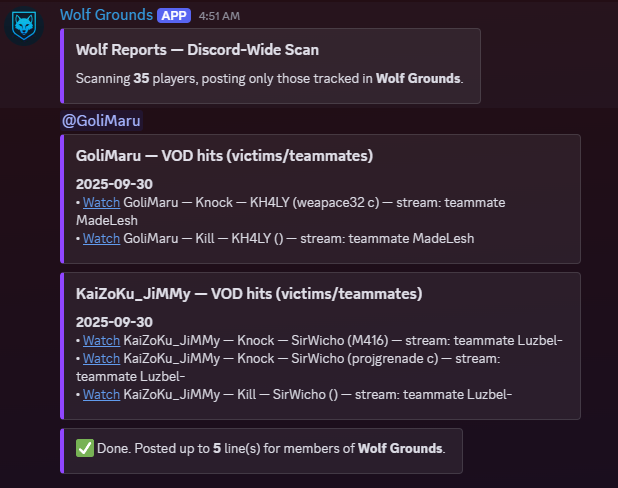 Wolf Report · 精彩击杀 + 回放
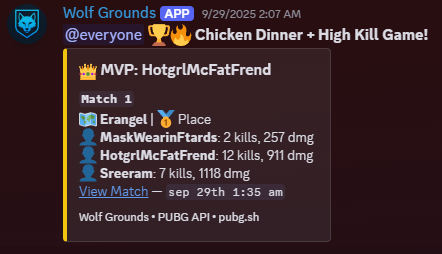 Chicken Dinner · 小队回顾
🎥 POV 1
🎥 POV 2
双视角剪辑
两个视角。
两个视角。
同一瞬间。
并排同步观看击杀者和被击杀者的 Twitch 回放。自动校正让两者误差保持在 ±0.4 秒以内。
⌨ 快捷键:
打开双视角 ↗
[ ] 左侧 · ; ' 右侧
🔒 自动同步 ±0.4 秒
🎥 任意两个 Twitch 回放
功能
你的 PUBG 服务器所需的一切。
设置毫不费力。Wolf Grounds 负责数据、精彩时刻、开播提醒和每周汇总,让你的社区不错过任何动态。
大家添加它的原因
数据与 K/D 走势
按模式查看个人数据、比赛记录、吃鸡回顾和 K/D 走势图。
独此一家
回放精彩时刻
把 PUBG 击杀遥测对应到主播回放。包含 Wolf Reports、剪辑和双视角链接。
排行榜
分模式排行榜(单排/双排/四排,FPP/TPP),支持最少场次筛选,Discord 消息清爽。
开播提醒
自动发布 Twitch 开播通知,不重复,并发到指定频道。把 PUBG 名字和 Twitch 账号关联起来。
AI 问答
用日常语言询问服务器的数据、武器熟练度、遥测和比赛记录,在 Discord 或网页上都可以。
武器熟练度
每位玩家的常用武器、伤害、击杀和熟练度等级,直接来自 PUBG API。
组队
创建组队帖,带加入/退出按钮、私人语音频道和实时在线玩家列表。
对决与目标
玩家之间为期 7 天的数据对决,以及面向整个服务器名单的社区目标。
进步与回顾
每周数据走势,以及根据全部遥测记录由 AI 生成的赛季回顾。
多服务器支持
每个 Discord 服务器都有独立的名单、直播订阅、目标和设置。
THE DEN
你在 Wolf Grounds 的主页:个人资料、最近的比赛和剪辑,以及你管理的每个服务器的设置、名单、消息和管理。
斜杠命令
任何数据,即刻获取。
无需后台面板。在 Discord 中一条斜杠命令即可使用所有功能。
/stats player
任意玩家的详细数据,可按模式筛选(单排/双排/四排,FPP/TPP)。
/stats leaderboard
按 K/D、伤害或吃鸡数排名的服务器排行榜,支持最少场次筛选。
/stats kd
玩家最近 N 场比赛的 K/D 走势图。
/stats weapon
武器熟练度详情:常用枪械、伤害、击杀和熟练度等级。
/stats wins
回顾玩家最近 5 次吃鸡及比赛详情。
/stats funfacts
根据服务器名单发布 5 个趣味排行榜。
/wolf report
你的 Wolf Reports:关联主播回放的精彩击杀和击倒。
/wolf clips
你的 Wolf Clips:主播视角的精彩击杀,附双视角链接。
/wolf card
生成带有本赛季数据、可分享的玩家卡片。
/wolf progress
每周数据走势,展示你的数据变化。
/wolf challenge
向其他玩家发起 7 天数据对决,并实时跟踪。
/wolf set-goal
为整个服务器名单设定一个共同追求的社区目标。
/wolf match-night
安排一场社区比赛之夜,由机器人通知服务器。
/wolf season-recap
根据你的全部遥测记录,由 AI 生成赛季回顾。
/discord lfg
创建带加入按钮和私人语音频道的组队帖。
/discord join
将一个 PUBG 名字加入本服务器的名单。
/twitch add
在本服务器订阅某位 Twitch 主播的开播提醒。
/twitch spotlight
根据最近的 Wolf Clips 推荐服务器里最强的 PUBG 主播。
/help
显示所有命令以及 Wolf Bot AI 助手的用法。
常见问题
常见问题
路线图
我们的方向。
正在上线的、接下来的和更远的计划。
现在
手机版网站优化
命令优化与问题修复
性能优化
即将推出
Wolf Reports 的地图和模式筛选
剪辑合集与分享素材
导出 CSV 数据
以后
公开 API
扩展到其他游戏
机器学习精彩时刻
更新日志
最新更新
Week of Sep 28, 2026
# 🐺 This week Wolf Grounds got a MASSIVE glow-up — setup's smoother, ranked tracking's bulletproof, and The Den just became your command center. Let's go. 🔥
Bug Fix
The play calendar on phones was squeezed into about two-thirds of the panel width, making the day squares smaller than they should be. It now uses the full width.
Bug Fix
New servers get their full settings panel in <#1430954539250487516> again, and servers that were missing it will get it automatically. Server owners now get one clear welcome message that says exactly what to do next.
Bug Fix
/wolf ask now has up-to-date ranked and season info: seasons last about two months, tiers run from Bronze up to Survivor (including Crystal), and each new season starts with placement matches based on last season's RP. It also no longer guesses at game facts it isn't sure about.
Bug Fix
The "Live now" bar on the website only shows streamers who are actually playing PUBG, and it now keeps itself up to date — streamers drop off within a few minutes of going offline, even if you leave the page open.
Bug Fix
Ranked promotion alerts now announce every division climb (like Gold IV to Gold III), not just new tiers. The Top Ranked crown now goes to the player with the highest rank and RP, where before players in the same division could tie and the crown went to whoever was listed first.
Bug Fix
Ranked promotion and drop announcements now post reliably. The bot checks everyone's rank every few hours, so climbing a tier gets called out soon after it happens instead of being missed. Players in more than one server now get announced in each of them.
Bug Fix
Throwback Thursday now posts every week; it had been skipping weeks. Stat challenges now score what each player gained during the 7 days instead of their whole season, and challenges that were never accepted expire so you can issue a new one. Season recaps post automatically when a new season starts, and crown announcements no longer say "dethroning None".
Bug Fix
Player stats pages and clan rosters now show when an account has been banned by PUBG again. Ban status is checked with every stats refresh, and the banner goes away if a ban is lifted.
Bug Fix
Crystal rank is now recognised properly. Moving from Platinum to Crystal is announced as a promotion instead of a rank drop, Crystal players now sit in the right place on the Ranked Crown and ranked leaderboard, and Survivor rank is supported too.
Bug Fix
Commands no longer time out with "The application did not respond" while the bot is checking recent matches for wins and high-kill games.
Bug Fix
Player profiles now show PUBG bans correctly, including for players who aren't in any Wolf Grounds server. Banned accounts get a clear "Permanent ban" or "Temporary ban" label instead of just looking inactive.
Bug Fix
/maps works again. It shows the full map image and lets you switch maps from the dropdown, and Rondo and Haven are now included.
Bug Fix
Clicking "Live on Twitch" on a player's card on the Feeds page, or the live badge on their stats page, now opens their stream. Before, it showed a Twitch error. The stream popup also has an "Open on Twitch" button if you'd rather watch there.
Bug Fix
Fun Friday and the weekly best match DM can now be switched on and off from the website.
New Feature
Server admins can run /discord setup to bring back the Wolf Grounds settings panel, or to finish setup after giving the bot the Manage Channels permission.
New Feature
Server owners can add up to 10 players at once with the new Add players button in #wolf-setup. Paste the names, and Wolf Grounds checks them all with PUBG and tells you which ones need fixing.
New Feature
New /stats ranked command for Pack Leader servers! See any player's ranked tier, RP, season-best rank, win rate, top-10 rate, average placement, KDA and damage. Pick a mode or let it choose the one you play most, and check last season too.
New Feature
/stats leaderboard now has a Ranked option for Pack Leader servers, a ranked ladder of your whole pack sorted by RP, showing everyone's current tier.
New Feature
The Ranked tab now shows your recent ranked Chicken Dinners and high-kill games, just like the Seasonal tab, with the same Last 6 / Last 7 days / Last 20 filters.
New Feature
Server owners can now manage Wolf Grounds on the web in The Den (wolfgrounds.com/den.php): a setup checklist, health checks that point to the exact channel or permission to fix, feature switches with undo, adding up to 10 players at once with every name checked on PUBG, Discord and Twitch links, and a log of every change.
New Feature
Plan squad nights and tournaments right from The Den on wolfgrounds.com: create Discord Events with a cover image, then announce them in one click. Members see the time in their own time zone. Available on Recruit and above.
New Feature
Moderation is now in The Den on wolfgrounds.com: find a member and time them out, kick or ban them with a reason, clean up a channel's recent messages, and keep a mod log. Available on Recruit and above.
New Feature
Moderation is now in The Den on wolfgrounds.com: find a member and time them out, kick or ban them with a reason, clean up a channel's recent messages, and keep a mod log. Available on Recruit and above.
New Feature
Need a hand? Server owners can now ask Wolf Grounds support straight from The Den on wolfgrounds.com. We'll see your server's setup right away, and you'll get a DM when we reply.
Improvement
Setting up Wolf Grounds is easier. <#1430954539250487516> now opens with a checklist that shows exactly what's left to do and ticks itself off as you go, all the way to your first tracked match.
Improvement
The settings panel in <#1430954539250487516> now has a button that opens your server's settings on wolfgrounds.com, where every feature has a proper on/off switch. We also tidied up how the sub-settings are displayed.
Improvement
Ask /wolf ask about your last solo, duo or squad match and it now searches your whole tracked history, not just your last 10 games. If you haven't played that mode, it tells you how far back it looked.
Improvement
/wolf ask can now tell you any player's current ranked tier and RP, plus their best rank this season and ranked-only stats like wins, K/D and average placement. Try "what rank is <name>?"
Improvement
If you run into trouble setting up Wolf Grounds, every setup message now shows exactly where to get help: a link to our support server and a direct way to message the developer.
Improvement
The Ranked tab on player stats pages has been rebuilt. It now shows exactly how many points you need for your next division, your season peak, win and top 10 rates, average damage, headshot rate and more. You can also compare all your ranked modes side by side. Over the coming days it will add a chart of your rank points across the season and where you stand among Wolf Grounds players. Players who aren't ranked yet are no longer mislabelled as Silver.
Improvement
Adding Wolf Grounds to your server now asks for far fewer permissions. It only requests what its features actually use, so there's nothing to untick and setup works first time.
Improvement
Match History got a full makeover to match the Weapons tab. You now get a summary of your recent games, a chart of your form where you can click any bar to jump straight to that match, a breakdown of where you finish and how you do on each map, filters with counts (including Wins only), and matches grouped by day. Opening a match now also shows how it compares with your usual game.
Improvement
Server and clan leaderboards have a cleaner look. The top spot now gets a smooth gold highlight with a crown and a "Season Leader" or "Top Clan" tag, the top three have new numbered rank badges, and damage totals show as whole numbers.
Improvement
The Weapons tab on phones now shows each weapon as a card with all its stats (kills, knocks, damage, headshot %, best game, longest kill), so there's no more scrolling sideways. Sort buttons sit above the list, and you can tap any weapon for its full breakdown.
Improvement
The "Kills per week" panel on the Weapons tab got a cleaner look: each weapon now has a full-width bar for this week's kills, plus a change-from-last-week indicator and mini trend chart once more than one week of history is in.
Improvement
The Den now has a Plan page. Subscribers can choose exactly which of their servers their subscription covers and move it between servers anytime.
Improvement
The Den now has a Plan page. Subscribers can choose exactly which of their servers their subscription covers and move it between servers anytime.
Improvement
Skill Grades are now fairer for players with only a few matches: one lucky game can no longer boost your grade. The grade badge on your stats page is also clearer and tells you how many matches your grade is based on.
Week of Sep 21, 2026
This week Wolf Bot got a complete glow-up—faster, smarter, more reliable, and packed with stats that actually tell your story. 🐺⚡
Bug Fix
Mentioning Wolf Bot is more reliable — if Discord briefly drops the connection, the bot now retries instead of leaving you with no reply. Also fixed garbled symbols showing up in some Wolf Bot error and cooldown messages.
Bug Fix
Subscribing to Wolf Grounds now gives you your tier role (Recruit, Packmate or Pack Leader) in the Wolf Grounds Discord right away. If you subscribed before joining the server, you'll get it when you join. Upgrading swaps your role automatically. Anyone who subscribed recently and didn't get a role will have it shortly.
Bug Fix
Clan names and tags now show on player profiles on the website where they were missing. Also fixed a bug that reset a player's stat history when two servers had added them with different capitalisation.
Bug Fix
Wolf AI no longer treats the M416 and HK416 as two different guns — they're the same weapon, and it was splitting your stats between them and giving contradictory advice. Weapon skins now count toward the right gun too, so your usage numbers are accurate.
Bug Fix
Numbered lists in Ask AI answers now count properly. Some answers were showing "1." on every point instead of 1, 2, 3, 4.
Bug Fix
Longest Kill on the website now shows a clean distance like "245m" instead of long decimals like "245.253m" on the Seasonal, Lifetime and Match History tabs.
Bug Fix
The Wolf Reports player on the homepage no longer shows a "Dual POV" button on clips that don't have a second viewpoint. The button now only appears when there's a dual view to open.
Bug Fix
Wolf AI now uses in-game weapon names in its answers, such as M416 instead of "HK416", SLR instead of "FN FAL" and S686 instead of "Beretta". Each gun also shows up under one name, so your recent-match and lifetime weapon stats match.
Bug Fix
Community goals now count only your own server's players. Before, games from every server using Wolf Grounds counted toward every server's goal.
Bug Fix
The profile menu in the top-right corner works again on the Discords page. Clicking your name there now opens your menu like it does everywhere else on the site.
Bug Fix
Rank badges now show up for everyone. Players who haven't played ranked this season were missing the badge beside their name entirely — they now get their Survival Mastery badge instead.
Bug Fix
Fixed the FAQ on the home page — answers were leaking a sliver of text under every question instead of staying closed. They now open and close cleanly.
Bug Fix
Match cards on the Feeds, Reports and Stats pages now show the proper Paramo map art and map name instead of a blank tile labelled "Chimera_Main". Any future map we haven't added art for yet will also fall back to a clean gradient instead of an empty box.
Bug Fix
The live community stats on the mobile home page — players tracked, total kills, headshot %, longest shot — were invisible on every phone. They're back.
Bug Fix
Fixed the home page scrolling sideways on phones. The top bar was wider than the screen, especially when signed in with a longer name.
Bug Fix
On iPhone, tapping the player search or any form field zoomed the page in and wouldn't zoom back out. Fixed.
Improvement
Clan pages now show each member's Discord servers as small server icons instead of a text label. Hover an icon to see the server's name.
Improvement
Tap any match in your Match History to see the full story: your squad's stats, a timeline of the match, every elimination with weapon and distance, who took you out, your drop and route on the map, and a breakdown of every fight. Kill lists now show all your kills too, including knocked players who bled out or went down when their squad was wiped.
Improvement
The Weapons tab got a big upgrade: see your signature weapon, how your kills split across weapon classes, your mastery level and tier, knocks and best game for every gun, normal vs ranked side by side, and where you rank in your clan and across Wolf Grounds. Weapon stats now stay up to date instead of showing old numbers.
Improvement
Ask AI on the website is now a real conversation. Ask a follow-up and it remembers what you just talked about, your earlier answers stay on screen, and a counter shows how many AI questions you have left today. Answers also look better, with proper stat tables, a copy button and a quick link to the player's full stats.
Improvement
The Player box on the Ask AI page now suggests tracked player names as you type, just like the Stats search. Pick a name with a click or the arrow keys and it takes you straight to your question.
Improvement
The player search on the Wolf Grounds homepage now suggests names from your very first keystroke, and it keeps working if the site has a brief hiccup instead of showing "No players found" until you reload.
Improvement
Player profile cards on wolfgrounds.com look cleaner on phones. The avatar, name, membership badges and stats are now centered instead of pushed to one side, and long player names no longer get cut in half.
Improvement
The Ask AI page looks tidier. The chat box and the info panel beside it are now the same height, and the question box sits at the bottom where you'd expect it.
Improvement
Season recaps and the weekly digest now label their numbers as "tracked games" (the wins and big games the bot posted), so they no longer show a misleading win rate or per-match average.
Improvement
The home page now shows the two most recent weekly update round-ups instead of every one ever posted, with a link to the new Changelog page where you can read the full history week by week.
Improvement
The Wolf Reports list on phones no longer traps your scroll. Swiping anywhere now scrolls the page, and there's a "show more" button for the rest of the reports.
Improvement
Tapping a live streamer on your phone now opens the stream at a proper size instead of a tiny letterboxed window.
Announcement
The roadmap on wolfgrounds.com has been refreshed. The web dashboard is live, so server admins can manage settings, rosters and Twitch links from the website. Next up: map and mode filters for Wolf Reports, clip packs, and CSV stats export.
Performance
Behind-the-scenes speed-up: we switched off a diagnostic setting that was slowing down every bot action, so commands and match posts respond more quickly when the bot is busy.
Performance
The website now uses much less of the database the bot also relies on, so busy moments on the site are less likely to slow down or knock out the Discord bot. Player, clan and leaderboard lists also keep working if the database has a brief hiccup.
Performance
Coming back to the website is faster. Pages you've already visited reuse what your browser saved, and the FAQ, Terms and Privacy pages only reload when something has actually changed.
Performance
Asking Wolf AI about your recent matches on the website is faster, because it no longer waits on downloads it didn't need.
Performance
Player profiles load faster. A player's clan tag and name now show up almost instantly instead of popping in last, and the rest of the profile and clan pages no longer load one piece at a time.
Performance
The rank badge beside a player's name appears much faster, and is instant when you revisit a profile or open one in a new tab.
Performance
The home page loads faster and uses less battery on phones. The background image is now a fifth of the size on mobile, and the animated hero effects no longer run on small screens.
联系我们